

WordPress
GSAP Animation
Use built-in GSAP animation options inside Elementor.
GSAP (GreenSock Animation Platform) is a high-performance JavaScript animation library. Nexsas includes GSAP animation support so you can add animations to Elementor widgets easily.
Overview
Nexsas integrates GSAP animations into Elementor so you can apply animations to widgets, sections, and columns without writing code.
Accessing GSAP animation settings
- Edit any page/header/footer/template with Elementor
- Select a widget, section, or column
- Open the Advanced tab
- Find the GSAP Animation section
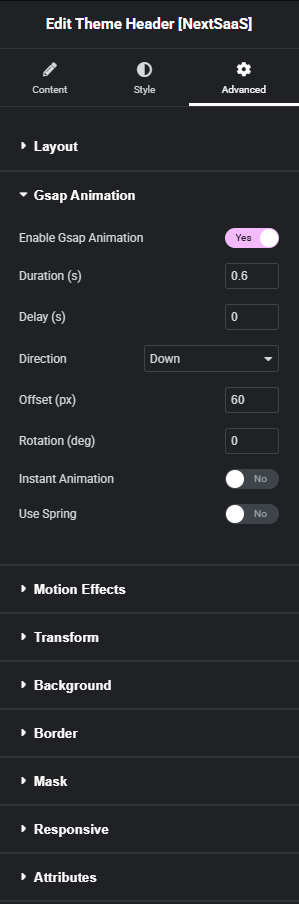
GSAP animation settings
Enable GSAP animation
- Yes: enable GSAP animation
- No: disable animation (other settings ignored)
Duration (s)
How long the animation takes (seconds).
Examples:
0.3: quick fade-in0.6: smooth standard1.2: slow reveal
Delay (s)
Delay before starting the animation. Useful for staggering multiple elements.
Direction
Controls where the element animates from:
- Down, Up, Left, Right
Offset (px)
How far the element moves during the animation.
Rotation (deg)
Rotation applied during the animation.
Instant animation
- Off: triggers when element enters viewport
- On: plays immediately on page load
Use spring
Enable spring physics for a bouncy effect instead of standard easing.
Need help?
If you need custom GSAP animations, email hello@pixels71.com.