

WordPress
Theme Installation
Install the Nexsas WordPress theme via upload or FTP.
Once you purchase the theme from ThemeForest, you can download two file types:
- All Files and Documentation
- Installable WordPress Theme File
If you download All Files and Documentation (zip name like themeforest-xxx-xxxxx.zip), extract it first to get the installable theme zip (for example themename-vxx_xx.zip).
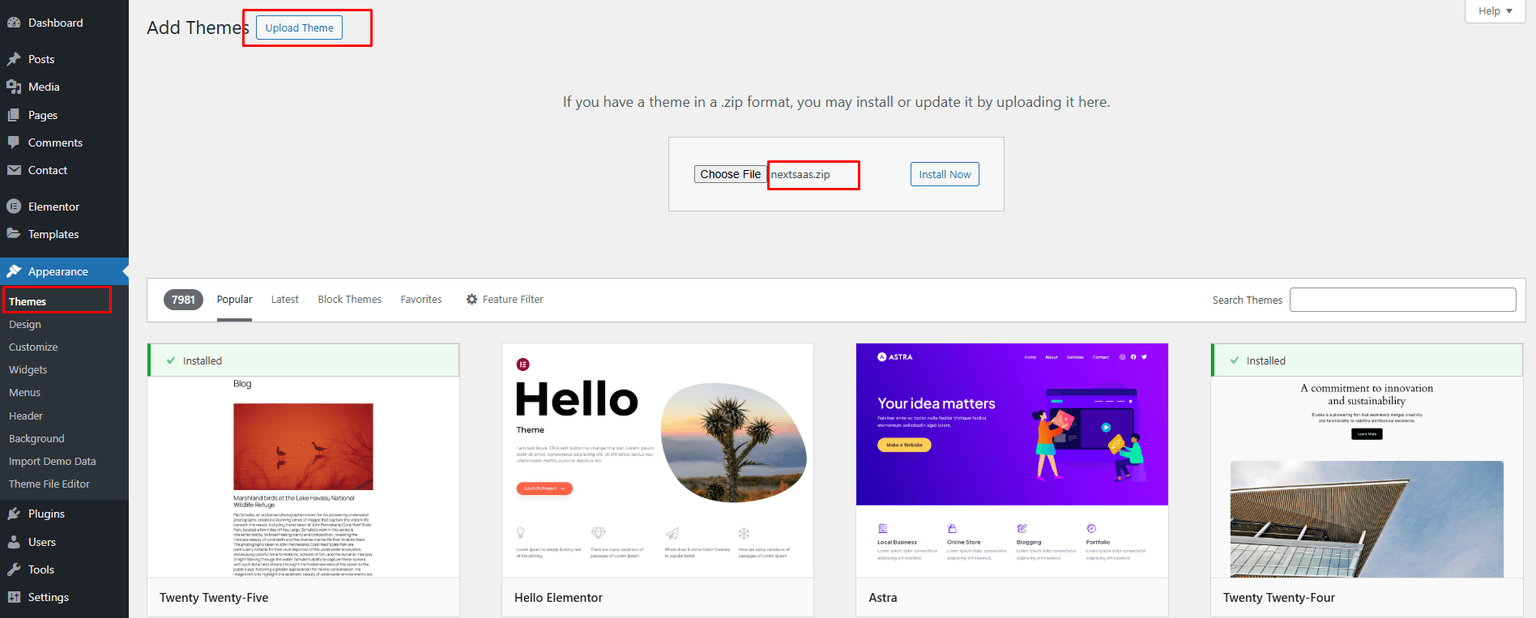
- Go to Appearance → Themes
- Click Add New and choose Upload
- Upload the theme zip file
- Done
Install theme via FTP
- Access your server via FTP
- Go to
wp-content/themes - Extract the zip and upload the
theme-name-vxx_xx/folder - Activate it from WordPress Dashboard → Appearance → Themes
- Done