

Theme Installation
Once you purchase the theme from themeforest, you'll be able to download 2 file type
- All Files and documentation
- Installable Wordpress Theme File
If you select to download all files and documentation ( the zip name will be themeforest-xxx-xxxxx.zip ), you have to extract it out ( to get themename-vxx_xx.zip file ) before installing it to WordPress system.
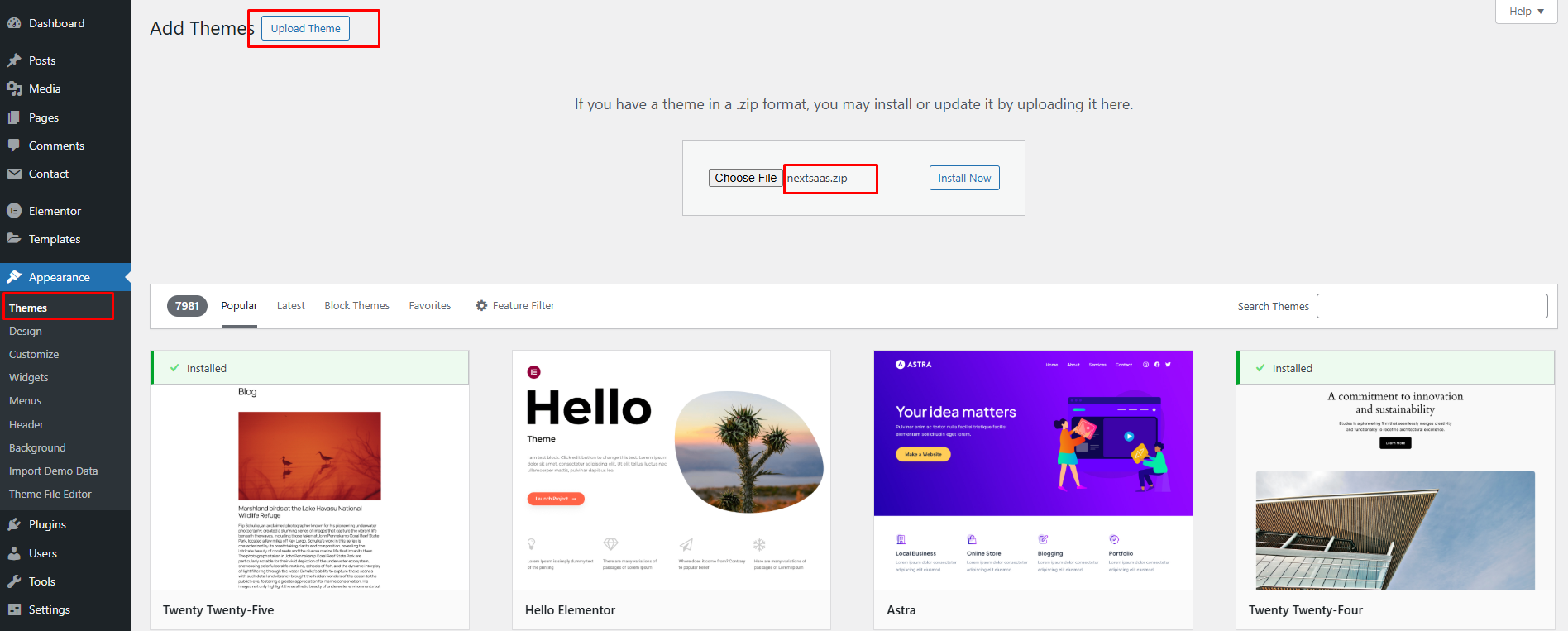
- Go to 'Appearance > Theme' section
- Click 'Add New' and select the 'Upload' option
- Upload the zip file
- All Done :)
Install theme via FTP#
- Access to the file on your server using ftp editor program
- Go to 'wp-content/themes' folder
- Extract the zip file and put the theme name-vxx_xx folder there
- Go to 'WordPress Dashboard > Appearance > Theme' section to activate the theme
- All Done :)